The Two Minute Friend Trivia Setup Checklist for Mobile
You drop a trivia challenge into your WhatsApp or iMessage group expecting fast banter, only to get radio silence when friends slam into a mandatory app install screen. Nothing drains chat momentum faster than forcing people to register an account just to guess your favorite habits.
Following a streamlined two minute friend trivia setup checklist allows you to bypass that friction entirely. By swapping forty minutes of tedious pub-quiz drafting for a rapid digital setup, you can launch an interactive friend quiz directly in your mobile browser in under two minutes.
This guide covers the exact 120-second mobile checklist to curate personal trivia prompts, channel the high-stakes apartment bet energy from Friends (Warner Bros. TV / HBO Max), and wake up your group chat. Along the way, you will discover the single prompt sequencing mistake that quietly causes friends to abandon the challenge before submitting their answers. This setup guide focuses strictly on zero-account mobile web play and excludes native app software.
- Situation: A quiet group chat needs an instant spark without requiring members to install third-party applications.
- Action: The creator enters their name on the site, cycles through habit prompts, and shares the generated custom URL straight into the message thread.
- Outcome: Friends tap the link, submit their guesses sequentially on a clean interface, and post their totals to the live friendboard in seconds.
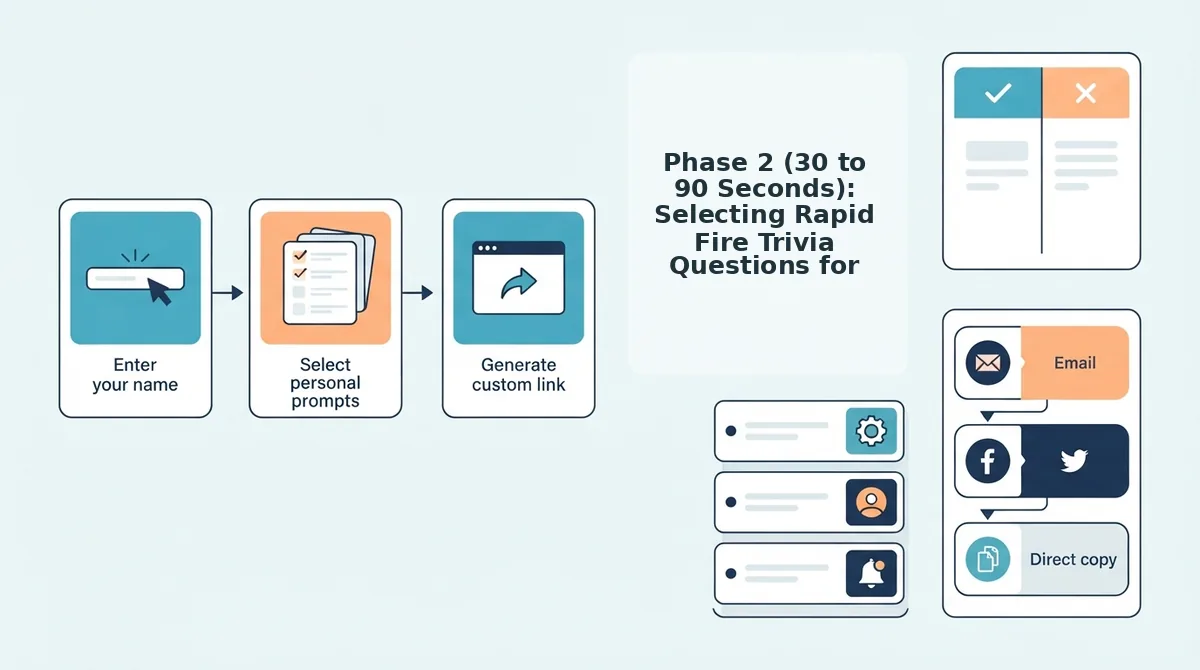
Review the prompt selection flow below to see how instant browser challenges eliminate onboarding drag while keeping group chat rivalries alive. Understanding the overall operational framework beforehand lets you breeze through each phase without second-guessing your options.
What Is on the Two Minute Friend Trivia Setup Checklist?
The two-minute friend trivia setup checklist is a mobile verification sequence that lets creators generate, configure, and launch a custom trivia link without app downloads, accounts, or multi-page forms. It organizes game preparation into three chronological speed-run phases across one hundred and twenty seconds to prevent player drop-off in high-velocity group chats.
Printable PDF scorecards and physical buzzers ruin modern chat banter before the game even starts. Forcing digital natives to print handouts or download heavy software transforms quick dares into administrative chores. Think of this mobile checklist like an express security lane: instead of unpacking heavy luggage, you move through an optimized touch-screen flow straight to the departure gate.
The two-minute friend trivia setup checklist is a three-stage mobile execution plan that streamlines personal challenge creation for high-velocity group chats on WhatsApp, iMessage, and Snapchat. Built entirely around lightweight web browsers, the framework requires only three zero-friction prerequisites: an active mobile browser, a chat display name, and zero mandatory account logins. Creators run through identity locking, habit curation, and link testing in under two minutes. This rapid workflow guarantees that recipients jump straight into trivia challenges, select answers sequentially, and view friendboard rankings without hitting app store barriers or registration forms.
To deploy your challenge before conversation stalls, complete these three progressive operational checkpoints:
- Phase 1: Identity Lock (0 - 30s). Type your creator name on the mobile homepage to claim your scorecard identity instantly without entering passwords or confirming email verification codes.
- Phase 2: Habit Curation (30 - 90s). Cycle sequentially through quick prompts about your real-world quirks, daily routines, likes, and dislikes to lock in your official answer key.
- Phase 3: URL Sandboxing (90 - 120s). Produce the personalized challenge link, test the mobile preview within your browser, and paste the URL into your target chat thread.
Mastering this three-tier pipeline eliminates browser reload friction and ensures friends encounter zero barriers when competing for bragging rights. If you want to compress this timeline even further, learn how to build a friend quiz in 60 seconds on mobile.
With the overarching timeline established, your first thirty seconds focus entirely on claiming a recognizable presence before building out your questions.
Phase 1 (0 to 30 Seconds): How to Lock Your Host Identity and Display Name
To lock your host identity and display name, enter the specific nickname your group chat uses rather than a generic first name on the homepage input field. This single step immediately brands your custom challenge URL, stops peer confusion, and ensures your friends know exactly whose trivia dare they are opening.
Ever have friends ignore a challenge link because they could not tell which "Alex" in the group chat sent it?
A host display name is the peer identifier that headers your trivia challenge and labels your final leaderboard. When you launch a friend quiz without account, your entered name serves as the primary metadata anchor across messaging apps like WhatsApp, iMessage, and Snapchat. If you share a generic first name with someone else in the chat, friends may bypass the challenge or credit the wrong person. Selecting an established group nickname locks your identity before the link ever reaches the thread.
Prerequisites: A mobile browser open to friendquiz.org and your active group chat handle in mind.
- Open your mobile browser to friendquiz.org (5 seconds). You will see the headline and an empty text entry box labeled with "Enter Your Name".
- Tap the text box and type your recognized chat nickname instead of your formal legal name (10 seconds). You should see your distinct handle appear clearly inside the input field without ambiguous initials.
- Inspect the cursor to clear any keyboard autofill errors (10 seconds). Check that your mobile device did not automatically insert a trailing whitespace or append a suggested emoji after your handle, which can garble metadata strings.
- Tap the button to start question setup (5 seconds). You should immediately transition from the entry screen to the first personal habit prompt with your name locked at the top of the interface.
A host identity locked without trailing spaces guarantees seamless link previews across all messaging platforms.
Once your display handle is locked in, the next minute determines whether your quiz generates hilarious debate or total silence.
Phase 2 (30 to 90 Seconds): Selecting Rapid Fire Trivia Questions for Friends
Selecting rapid-fire trivia questions requires locking in 5 to 10 observable routine prompts within 60 seconds to ensure high response rates across mobile group chats. Prioritizing visible daily quirks over obscure inside jokes keeps participants actively guessing instead of abandoning the challenge midway.
The 80/20 Habit-to-Deep-Cut Ratio is a question-selection strategy where 80 percent of prompts evaluate observable daily routines and 20 percent cover specific personal history. While hyper-specific memories from years ago might feel meaningful, they routinely alienate newer friends and slow down pacing. Daily lifestyle habits spark immediate banter because everyone in your iMessage or WhatsApp circle has an opinion on them.
To maximize engagement, follow the micro-round scheduling models popularized by Tasty Trivia, which emphasize keeping rounds capped between 5 and 10 rapid prompts max. Anything longer causes mobile completion fatigue.
| Prompt Type | Typical Examples | Completion Rate | Banter Potential | Best For |
|---|---|---|---|---|
| Observable Habit Prompts | Morning beverage, messaging speed, punctuality | Very High | Universal debate in group threads | Active group chats and casual acquaintances |
| High-Dropoff Deep Cuts | Childhood pets, obscure high school memories | Low | Niche discussion between two people | Childhood best friends in one-on-one DMs |
| 80/20 Balanced Setup | 8 daily habit picks mixed with 2 personal milestones | High | High competition and leaderboard rivalry | Mixed groups of close friends and new peers |
How do you decide which setup to run before hitting send?
- Choose Observable Habit Prompts if you are dropping your link into an active group chat where people have varying friendship histories.
- Choose Deep Cuts if you are challenging a singular lifelong companion via a dedicated Best Friend Quiz showdown.
- Choose the 80/20 Balanced Setup if you want competitive scoring across both close pals and newer social circles.
Our recommendation is the 80/20 Balanced Setup. Observable habits like ordering habits or unread message counts invite instant guesses, while a couple of deeper quirks reward your inner circle. To streamline this step, review our guide to pick friend quiz personal trivia prompts fast without overthinking your choices.
Once your questions are tapped out, Friend Quiz packages your picks into an instant link with zero app downloads or account logins required. Grab your link, drop it into your chat, and let the real-time Friendboard track who holds ultimate bragging rights.
Before pasting that fresh URL directly into your group thread, spend thirty seconds validating that the guest experience works as intended.
Phase 3 (90 to 120 Seconds): How to Sandbox and Verify Your Custom Link
To sandbox and verify your custom friend trivia link, copy the generated URL into a private mobile browser tab to confirm that the game loads without registration barriers or layout shifts. Running this 30-second inspection prevents dead-link drop-offs across WhatsApp and iMessage by ensuring friends land directly on question one.
Link sandboxing is the quality-assurance practice of testing a newly generated URL inside an isolated, unauthenticated session to verify real-world visitor permissions and visual performance.
Web-native URLs eliminate link bounce friction by rendering interactive trivia directly inside in-app messaging webviews. In contrast, third-party native app store redirects trigger immediate drop-offs because casual group chat participants routinely abandon challenges that demand downloads or account sign-ups. Before distributing your link, ensure you have your copied challenge URL from a speed-run friendly quiz maker and a mobile browser with incognito browsing enabled.
Why risk stalling your group chat with an untested link?
- Copy the challenge link directly from the final completion screen (Time: 0 to 5 seconds). Tap the primary copy icon to place the raw destination URL onto your mobile clipboard. You should see a confirmation notification stating that the URL is saved to your clipboard.
- Launch an incognito window to execute a URL parameter test and assess mobile viewport render speed (Time: 5 to 15 seconds). Open Safari Private Browsing or Chrome Incognito, paste the URL into the address bar, and tap go. You should see the quiz interface paint cleanly in under two seconds without broken query parameters or display lag.
- Inspect the landing view to confirm zero-login validation (Time: 15 to 30 seconds). Check that your host display name appears correctly above an empty guest name input box with no account creation prompts or modal banners. You should see an active start button ready for guest taps.
Once your sandbox window verifies seamless guest entry, your challenge is ready to deploy to your messaging groups.
Having a functional link is only half the battle; how you deliver it to your friends determines whether they play immediately or leave you on read.
The Chat Drop: Speed Trivia Rules for Casual Game Night Launches
A successful chat drop pairs a custom trivia link with a strict submission deadline and clear stakes to generate immediate participation. A chat drop is a real-time messaging broadcast that turns an interactive link into a competitive sprint across mobile channels.
Why do most group chat links get ignored? Sending a raw link with zero context kills completion, whereas pairing it with clear micro-rules sparks instant peer banter.
- Enforce the strict first-guess rule: This constraint invalidates repeated attempts and registers only an entrant's initial instinct. It preserves fair play by ensuring friends cannot run duplicate dummy tests to reverse-engineer correct answers. Instruct your chat that only their first entry recorded on the live friendboard counts toward the final podium.
- Attach a hard two-minute countdown: This micro-rule requires participants to finish the trivia flow immediately upon opening the URL. Urgency eliminates analysis paralysis and prevents friends from putting the challenge off until the conversation dies. Drop the timer directly into your message text: "The timer is live, you have exactly two minutes to lock in your score."
- Ban external search engine lookups: This restriction prohibits players from scrolling historical chat logs or image galleries to verify personal habits. It forces participants to rely strictly on memory, producing authentic answers and spontaneous errors. Warn your Discord or iMessage group that running message search queries results in an automatic bottom-tier forfeit.
- Deploy copy-paste platform launch scripts: This protocol packages your link inside a ready-to-read text template tailored for rapid group engagement. Context converts passive observers into active challengers when distributing a friendship dare quiz online. Broadcast this script to WhatsApp: "🚨 Game Night Sprint: Answer the 10 trivia prompts right now. First attempts only, link closes in two minutes: [LINK]."
- Set tangible social stakes before distribution: This micro-rule attaches a playful social penalty or reward to the final placement rankings. Concrete consequences motivate players to care about every single question rather than skimming past options. Announce in the thread that the lowest score owes everyone snacks or must update their chat status for twenty-four hours.
Deploying these ground rules turns casual link sharing into an event, but hosts often run into a few common logistical questions during game night.
Frequently Asked Questions About Quick Friend Trivia Setup
Quick friend trivia setup requires selecting observable daily habits, avoiding third-party apps, and sandboxing links to achieve zero-friction participation in under two minutes. Keeping the setup lightweight prevents player drop-off and maintains banter momentum across active group chats.
How many questions should you include in a quick friend trivia quiz?
A quick friend trivia challenge requires strictly 5 to 10 questions to preserve sub-two-minute completion speeds across fast-moving group chats. Exceeding ten prompts introduces tap fatigue and higher bounce rates, whereas fewer than five questions fails to separate casual acquaintances from genuine best friends on the leaderboard.
Do friends need an app or account to take the quiz?
No, friends do not need an app download or account login to complete your trivia challenge. Participants tap your shared web link directly inside messaging apps like WhatsApp or iMessage, select their answers in their standard mobile browser, and submit their responses in seconds without friction.
Why is automated browser scoring better than manual score tallying?
Automated browser scoring instantly verifies answers and updates standings, completely eliminating the time-consuming calculation errors of manual score tallying or printable paper sheets. The platform calculates each guess in real time, delivering immediate feedback to the participant and updating the friendboard rankings without any host intervention.
How do players view their friendboard rankings after completing trivia?
Players view their friendboard rankings immediately upon submitting their final guess on their mobile screen. The automated post-quiz screen breaks down two distinct metrics:
- Direct Score: The raw total of correct personal habit guesses.
- Group Standing: Current leaderboard rank compared against everyone else in the chat.
With all technical and mechanical questions addressed, you have everything needed to launch your next social dare.
Launch Your Two Minute Friend Trivia Run Now
Executing the two-minute friend trivia setup framework transforms a dormant group chat into an active competition without requiring account registrations or mobile app downloads.
Your complete 120-second deployment resolves across three rapid phases:
- 0:00 - 0:30: Lock your recognizable host name on the homepage.
- 0:30 - 1:30: Select your personal habits and rapid-fire trivia prompts.
- 1:30 - 2:00: Verify your custom link and copy it to your clipboard.
Why does this streamlined workflow outperform traditional quiz tools? Eliminating login barriers and intrusive loading screens ensures your friends complete every question immediately rather than bouncing before the first prompt.
Wake up your group chat right now by entering your name to build your Friendship Dare challenge and dropping the link directly into your favorite messaging thread.
The fastest route to reviving any group chat is zero setup friction, instant social stakes, and undeniable proof of who pays attention.