How to find public friend quizzes worth playing with your crew
Your group chat has gone quiet for three days, and the last message is an unanswered meme. You want to wake it up, but most quiz pages stall before anyone taps an answer because of account walls, ad clutter, and multi-page reloads.
That frustration is fair. Public friend quizzes offer a faster route: your crew plays a ready-made challenge in a mobile browser, you check it fits the group, and then you build your own.
This guide covers the four discovery lists worth browsing, a quick pre-share check, and the build step. It also covers the one quiz type that backfires in group chats.
Browse a public directory, pick a quiz that matches your chat's mood, and paste the link. Then make your own so the bragging rights feel personal.
Where can you find public friend quizzes to play with friends?
Public friend quizzes are ready-made friendship challenges that anyone can play from a shared link. Friend Quiz sorts them into four discovery directories: Trending, New, Weekly Top, and Monthly Top. Each one plays in a mobile browser with no account, email, or app download.
Think of the directories like the charts in a music app. You don't need to own the album to press play.
That matters because many top search results for this topic are videos. You can watch a video quiz, but you can't send it to friends as a playable link.
What you need
- A phone with a browser
- A group chat on WhatsApp, iMessage, or Snapchat
- A quiz link to paste
Worked example: reviving a quiet chat
- Open the trending friend quizzes.
- Tap a quiz and skim its prompts.
- Copy the link and paste it into the chat.
To build a weekly habit, learn how to find trending friend quizzes to play this week. When your crew is warmed up, you can create your own quiz from your name and a few prompts.
Trending, New, Weekly, or Monthly: which list should you browse?
Pick the list that matches your goal. Open Trending to wake up a dead chat right now, New for fresh prompts, Weekly Top for what's working lately, and Monthly Top for proven formats.
| List | Best for | When to open it |
|---|---|---|
| Trending | Chat revivers | Wake a dead chat now |
| New | Novelty seekers | Find fresh prompts |
| Weekly Top | Regular players | See what's working lately |
| Monthly Top | Cautious sharers | Use proven formats |
Trending: best for waking a quiet chat
Trending fits the moment your group chat goes silent and you need a quick spark. It surfaces quizzes people are playing now, so it suits fast, low-effort sharing. To see why momentum matters, read why trending quizzes keep group chats active.
New: best for fresh prompts
The newest public quizzes suit crews who have already played the popular ones. Newer quizzes may be less polished, so skim the prompts before sharing. In return, you get questions your friends probably haven't seen.
Weekly Top: best for what's working lately
Browse this week's top quizzes when you want something current but already tried by other players. This list sits between Trending's urgency and Monthly Top's track record, so it works well for weekend group chat plans.
Monthly Top: best for proven formats
Open this month's top quizzes when you'd rather not gamble on a new format. It suits cautious sharers and large group chats. You trade some novelty for formats that other players have kept coming back to.
A good public quiz still has one built-in limit.
Why isn't a stranger's quiz a real friend test?
A public friend quiz is a trivia challenge built on its creator's habits, quirks, likes, and dislikes. Playing one tests what your friends can guess about a stranger, not what they know about you.
Every question has one correct answer, and that answer belongs to whoever made the quiz. Your crew is effectively grading itself on someone else's family recipe: the dish might be great, but nobody at your table cooked it.
Can a public friend quiz show who knows you best? No. A public friend quiz scores your friends against its creator's answers, so a high score only means someone guessed a stranger's favorite snack or morning routine correctly. This is the quiz type that backfires. If you send a stranger's quiz as a "who knows me best" test, your closest friend can lose to a lucky guesser, and the chat ends up arguing about a person none of you have met. Treat public quizzes as a warm-up and a format library, then build the real test from your own answers.
The rule is simple: borrow the format, not the answers. The format means the question types, pacing, and tone. The answers are the personal facts.
Play a public quiz, notice which questions got the most replies, then rebuild those question types with your own answers in a real friendship test.
How to check a public quiz before sharing it with your group chat
Run five quick checks before you paste a public quiz link: privacy, tone, phone readability, open access, and play style. This Chat-Safe Pre-Share Checklist takes about a minute and prevents most awkward moments in group chats.
- Scan for personal details. Look for questions that expose an address, school, or private habit your group would rather keep out of the chat. Answer privacy matters in WhatsApp, iMessage, and Snapchat threads, so skip any quiz that asks for more than you would post openly.
- Match the tone to this group. A crush question that lands with close friends can feel strange in a family chat. Read every question with this specific audience in mind.
- Preview each question on a phone. Long questions and cramped answer choices slow players down on small screens. Open the quiz on your own phone and make sure each question reads at a glance.
- Confirm the link opens without an account. Every login wall or download prompt costs you players. Open the link in a private browser tab to see exactly what your friends will see.
- Pick a showdown or a casual round. Some groups want a scored Friendboard ranking, and others just want a quick laugh. Ask the chat which one they want before you post.
Worked example: Take one quiz with a question about late-night snacking and another about an ex. The family chat gets the version without the ex question, and the close-friend chat gets the full set.
Link won't open in the chat? Messaging apps often open links in a built-in browser that can stall or block pages. Copy the link, paste it into your phone's main browser, and see how to share a quiz link in a group chat for more fixes.
How to turn a public quiz you liked into your own in under two minutes
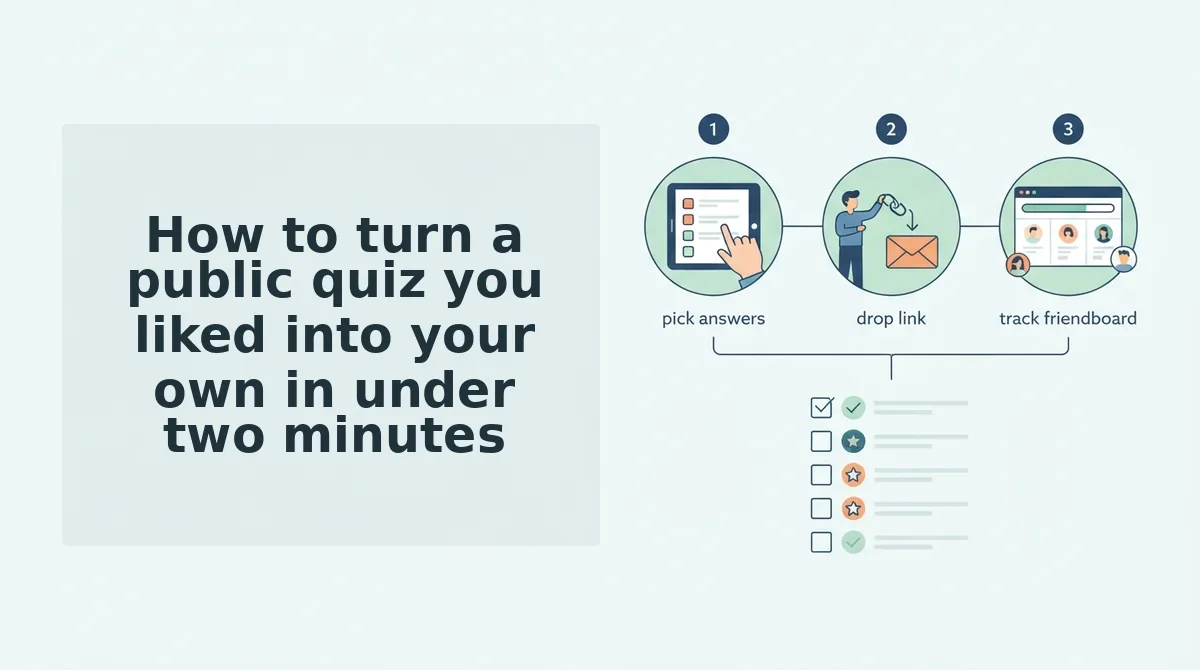
Spot a format you enjoyed, note its question types, then enter your name, answer the prompts, and copy your share link. The whole browse-to-build flow fits in about two minutes.
What you need: a phone browser, a group chat to share in, and a public quiz your crew already liked. You don't need an app, an account, or an email.
- Spot a format you like (about 20 seconds). Scroll back through the chat and find the public quiz that got the most replies. Formats such as Psych2Go's "What Type of Friend Are You?" or Quiz Dose's "Most Likely To" show the kinds of formats people enjoy playing. You should now have one format in mind.
- Note its question types (about 20 seconds). Decide whether the quiz used habits and quirks, likes and dislikes, dare-style, or most-likely-to questions. You should end with one or two types to reuse, such as habits plus dares.
- Type your name on the homepage and answer the prompts (about 60 seconds). Cycle through the personal trivia prompts using your real answers, not the stranger's. You should see your personalized quiz ready to share.
- Copy your share link and post it (about 10 seconds). Paste the link into the same chat that played the public quiz. Your friends should be answering questions about you within moments.
Pro tip: Run a public quiz as the warm-up, then post your own link once the chat is active. Players who just finished a quiz are already in the mood for round two.
Want the real "who knows me best" verdict? Make your own best friend quiz, or try a friendship dare quiz if your crew loved the dare-style questions.
Once the answers roll in, the next question is whether the round actually landed.
How do you know your quiz round worked?
Your quiz round worked if the group chat talks back: friends reply, links get played, and names land on your Friendboard. A Friendboard is a real-time leaderboard that ranks everyone who played the same quiz, so bragging rights get settled live.
Start with the simplest signal: friends reply in the chat. Next, check that they actually open and finish the link instead of just reacting to it.
The strongest signal is rivalry. A Friendboard works like a bowling alley scoreboard: once names appear, people check their spot and demand a rematch. When friends start comparing positions, see who's on top.
If nothing moves, revisit checklist item 3 (phone readability) or item 4 (no-account access), or switch lists with the Directory Picker.
Public friend quiz FAQ
These answers cover the practical questions that come up most often when you share a public quiz with your group.
Do my friends need an account to play a public friend quiz?
No. Friends open the link in their mobile browser and play instantly, with no account, email, or app download. For details, see do friends need an account to play.
Which chat apps can I share a public quiz in?
You can share it in WhatsApp, iMessage, Snapchat, and Instagram, because every quiz travels as a single link. That makes public quizzes easy friend quizzes to play in group chat.
Can the whole group compare scores?
Yes. Every player who finishes appears on the Friendboard, which ranks scores in real time. The whole crew can check positions, trade jabs, and replay to climb.
What is the difference between a public quiz and a BFF test?
A BFF test is built on your own answers, so it measures how well friends know you specifically. A public quiz reflects a stranger's answers. Try a quick BFF test.
Browse for ideas, then send a quiz about you
Public quizzes are the warm-up. The round your crew remembers is the one about you, because only your own answers turn a quiz into a real friendship test.
Three moves get you there:
- Use the Directory Picker to pick a list that matches your group's mood.
- Run the 5-point check before anything hits the chat.
- Borrow the format, not the answers.
When you're ready, create your friend quiz. Enter your name and start, then let your Friendboard reveal who really knows you best.