How long does it take a group chat to finish a best friend test?
The best friend test link drops in the WhatsApp group. Two thumbs-up reactions, one "lol later," and then nothing happens for hours.
That silence is frustrating, especially after you put real thought into your questions. How fast friends finish a best friend test depends less on your friends and more on what stands between the link and the first question.
Best friend tests are a mainstream group format, and Beta Squad's widely viewed Best Friend Test video helped make them familiar. On Friend Quiz, a creator posts the link in a WhatsApp group chat, and friends tap it straight into their mobile browser with nothing to install.
This guide gives you a direct timing answer and five creator moves that keep a round moving. You will also get the Drop-to-Done checkpoints, a map of where rounds stall. Keep one thing in mind as you read: the slowdown is rarely the questions.
Key Takeaway: Setup takes under two minutes, and friends answer in their mobile browser with no account, email, or app needed. Friend Quiz does not publish an average completion time, so your round's speed depends on how much friction you remove.
How Long Does It Take a Group Chat to Finish a Best Friend Test?
A group chat finishes a best friend test only as fast as its slowest step allows. Friend Quiz setup takes under two minutes, and friends answer in their mobile browser with no account or app. The site does not publish an average group completion time, so friction decides your pace.
Group completion time is the stretch between the moment a quiz link lands in a chat and the moment the last friend submits answers. Think of it like a convoy on a highway: the whole group arrives only when the slowest car does.
Why setup is the predictable part
Creator setup follows a short workflow. You enter your name, answer the personal prompts about your habits, quirks, likes, and dislikes, and then share the link. That sequence takes under two minutes, which makes it the one part of the timeline you control directly.
The answering side is less predictable, and Friend Quiz says so plainly by not stating an average completion time. Friends open the link inside WhatsApp, iMessage, or Snapchat in-app browsers without creating an account, entering an email, or downloading anything. Each prompt appears in sequence, so nobody waits for a new page to load between questions. Slow finishers are often busy, not bored. A friend who sees the link at work or on a commute may tap in hours later, and nothing in the flow should punish that delay. When every step is light, a late opener can still finish in one sitting instead of abandoning the round.
The criteria that decide finish speed
Legacy quiz sites often stack signup forms, app prompts, and full-page reloads between questions. Few of them ever answer the timing question at all. Use these criteria to judge any quiz flow:
| Criterion | What slows it | What speeds it |
|---|---|---|
| No account wall | Mandatory signup or email entry | Open the link and answer immediately |
| No app download | Redirects to an app store | Runs in the chat's in-app browser |
| Single-flow answering | Page reloads between questions | Sequential prompts on one flow |
| Touch-friendly taps | Tiny buttons and typed answers | Large one-tap choices |
| Clear submit button | A banner covering the submit button | Nothing blocking the final tap |
To see these criteria in practice, start a best friend test or read more about running a friend quiz without account logins.
Quick Picks: The Drop-to-Done Checkpoints at a Glance
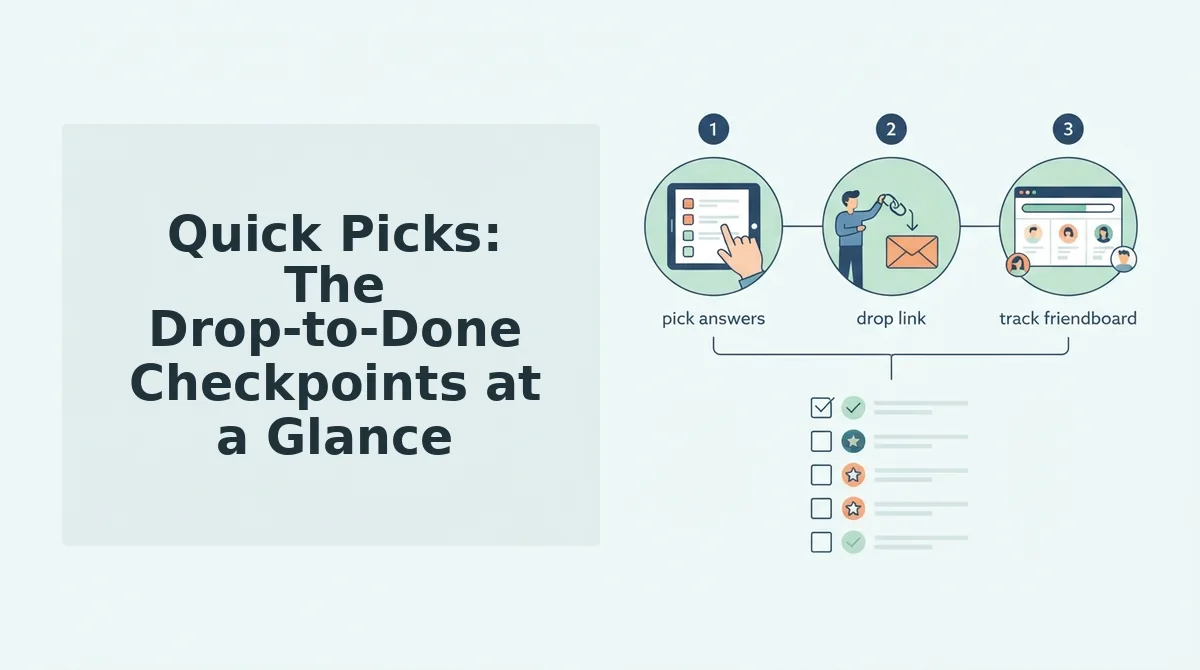
The Drop-to-Done checkpoints are five moments every round passes through: link drop, tap, first prompt, last answer, and Friendboard check. A round stalls when friction blocks any one of them.
Before you start: you need a phone, an active group chat, and under two minutes for setup.
- Drop the link. Paste your quiz link into the group chat after the enter name, answer prompts, share link workflow. You should see the link preview land in the thread. (Pairs with Move 1.)
- Get the tap. Ask friends to tap the link directly in the chat. Success looks like the quiz opening in the in-app browser with no install screen. (Pairs with Move 2.)
- Reach the first prompt. Check that friends land on question one without a signup form. A friend opening from iMessage should pick an answer with one tap, with no profile and no reload. (Pairs with Move 3.)
- Lock the last answer. Confirm the submit button sits clear of banners. Friends should see their score right after the final tap. (Pairs with Move 4.)
- Check the Friendboard. Open the Friendboard, the live ranking that shows who scored highest. New names appearing there means the round is moving. (Pairs with Move 5.)
| Checkpoint | Friction that kills it | Fix |
|---|---|---|
| Link drop and tap | App install prompt | Zero-account link |
| First prompt | Signup form | Zero-account link |
| Mid-quiz | Page reload | One-page flow |
| Last answer | Banner covering submit | Sequential touch-friendly prompts |
A zero-account link is a quiz URL that opens straight to the questions without login, email, or download. Tap-to-first-prompt is where most rounds die, which is why friends quit before question three.
Speed comes from removing steps, not from cutting questions. Make a BFF quiz in under two minutes and let the Friendboard track who knows you best.
Next, the creator moves that keep each checkpoint clear.
5 Ways Creators Keep the Round Moving
Now the fun part. Creators keep a best friend test moving by timing the drop, removing doubt about apps and logins, sparking rivalry, nudging kindly, and handing the chat a next challenge. Each move below protects one Drop-to-Done checkpoint, ranked from highest impact to lowest.
1. Drop the Link Right After a Chat Spike
Post your quiz link when the group is already active. A spike is a burst of messages, such as a meme thread, weekend plans, or a heated debate. Friends who are already looking at the chat don't need a notification to pull them back.
This works because a link posted into a quiet chat sinks under later messages before most people see it.
Checkpoint protected: the drop, where the link lands in front of awake, scrolling friends.
2. Say "No App, No Login, Just Tap" in the Same Message
Remove setup fears before anyone has to ask. Many people hesitate at a link because they expect a download screen or a sign-up form. Friend Quiz opens straight in the WhatsApp, iMessage, or Snapchat browser, so tell them that upfront.
This works because the doubt that stalls a tap disappears before it forms. Add the phrase "no app, no login, just tap" to the same message as the link, not a follow-up, so both appear together in the chat preview.
Checkpoint protected: the tap, where curiosity becomes an open quiz.
3. Call Out the Friendboard Leader
Name whoever is winning to turn quiet friends into competitors. The Friendboard shows who clinches first place in real time. A message like "Maya's on top with a near-perfect score, anyone think they know me better?" reframes the quiz as a contest.
This works because friendship tests feel more like a shared game than solo homework. Quiz N' Chill's friendship test videos make the same point, showing friends taking tests together and reacting to each other's answers. Screenshot your Friendboard rankings after the first two or three scores come in.
Checkpoint protected: the answer stage, where stragglers finally open the link.
4. Nudge Slow Finishers Kindly
Ping late players with warmth, not guilt. A friend who hasn't answered is usually at work, driving, or mid-shift. They aren't ignoring you. Busy is not bored.
This works because a playful nudge keeps the door open, while a pointed "still waiting on you" makes the quiz feel like a chore. Mention them by name with something light, such as "Jordan, your spot on the board is getting lonely," and leave it there.
Checkpoint protected: the finish, where the last few scores land so the round can close.
5. Follow Up With a Friendship Dare Link
Hand the chat a new challenge once the last answer lands. Friendship Dare links are an interactive follow-up format, so the energy from the round carries into a second activity instead of fading.
This works because a finished quiz leaves a natural pause, and a new link fills it before the chat drifts. After you announce the winner, follow up with a Friendship Dare and invite the top scorer to go first.
Checkpoint protected: done, where one finished round becomes the start of the next.
Best Friend Test FAQ: Apps, Accounts, Question Count, and Limits
The short answers: friends need no app or account, and the Friendboard shows rankings. In fairness to you, Friend Quiz does not publish an average completion time, a question count, or a player cap, so this FAQ doesn't guess at them.
Do friends need an app or account to answer a best friend test?
No. Friends don't need an app, an account, or an email address to answer a Friend Quiz best friend test. They tap the link you share and answer right inside the in-app browser of WhatsApp, iMessage, or Snapchat, with no download screen or sign-up form in the way. This is why a single message can take a friend from link to answers. If your group lives on Snapchat, see how to play a BFF test on Snapchat without an app.
How many questions are in the best friend test?
The exact question count is not stated on the site. Creators cycle through a sequence of prompts about their habits, quirks, likes, and dislikes, and the platform packages those answers into the quiz. Try the friendship test yourself to see the current flow.
Is there a limit on how many friends can take my quiz?
Friend Quiz does not state a player cap. The site doesn't publish a maximum number of friends per quiz link, so share it in group chats and social feeds as you normally would and watch the scores come in.
Can I see who scored highest?
Yes. The Friendboard ranks your friends by score and shows who clinches first place in real time. The site doesn't promise finish-order timestamps, so treat the board as a ranking of scores rather than a record of who finished first.
Share the Link, Then Watch the Friendboard
Group chats don't finish a best friend test faster because the quiz is shorter. They finish faster because there is less friction and the timing is better. The fastest rounds remove every reason to hesitate and give friends a reason to compete.
- Remove steps: Make it clear that friends need no app and no login.
- Drop at a spike: Post the link while the chat is already active.
- Keep it going: Use the Friendboard and a Dare to start the next round.
Picture the final move in action. You check the Friendboard and post, "Sam's untouchable at the top." The replies roll in, and then you drop a Friendship Dare link so the banter keeps going instead of fading.
Creating your quiz takes under two minutes: enter your name, answer the prompts, and share. Enter your name and share your link, then let the Friendboard show who really knows you.